Hands-on AI tutorials, workflows & ready-to-use toolkits

Build useful things with AI. Follow step-by-step guides to coding, agents, video creation and automation, then put what you learn to work with practical templates and project files.

AI Tools

Find tools for your task. Compare what they do, how to access them and what they cost.

Tutorials

Follow clear guides to installation, setup, everyday use and troubleshooting.

Workflow and Side Hustles

Build repeatable workflows for content, video and automation, or learn how to scope and deliver client projects.

Resource Packs

Start with a free sample. Check the contents and requirements before choosing a complete pack. Your files are available in My Downloads.

Start with a task

What would you like to do first?

Choose a path: work with long documents, deliver AI videos for clients, or build an automation. Read the guide, try a sample and decide whether you need the full toolkit.

See what you can make

These examples come from our downloadable files. Practice data is fictional; it does not represent client work or production account results.

Document workflow

Check the figures—and what they actually mean

Source: 120 enquiries, 72 completed bookings. Proposal status: pending approval.
What to check: an enquiry is not a booking, and pending approval does not mean launched.

Use the fictional source document, shared prompts and human-reviewed reference answers to compare tools on the same task.

Get the Free Comparison Worksheet →
Client video workflow

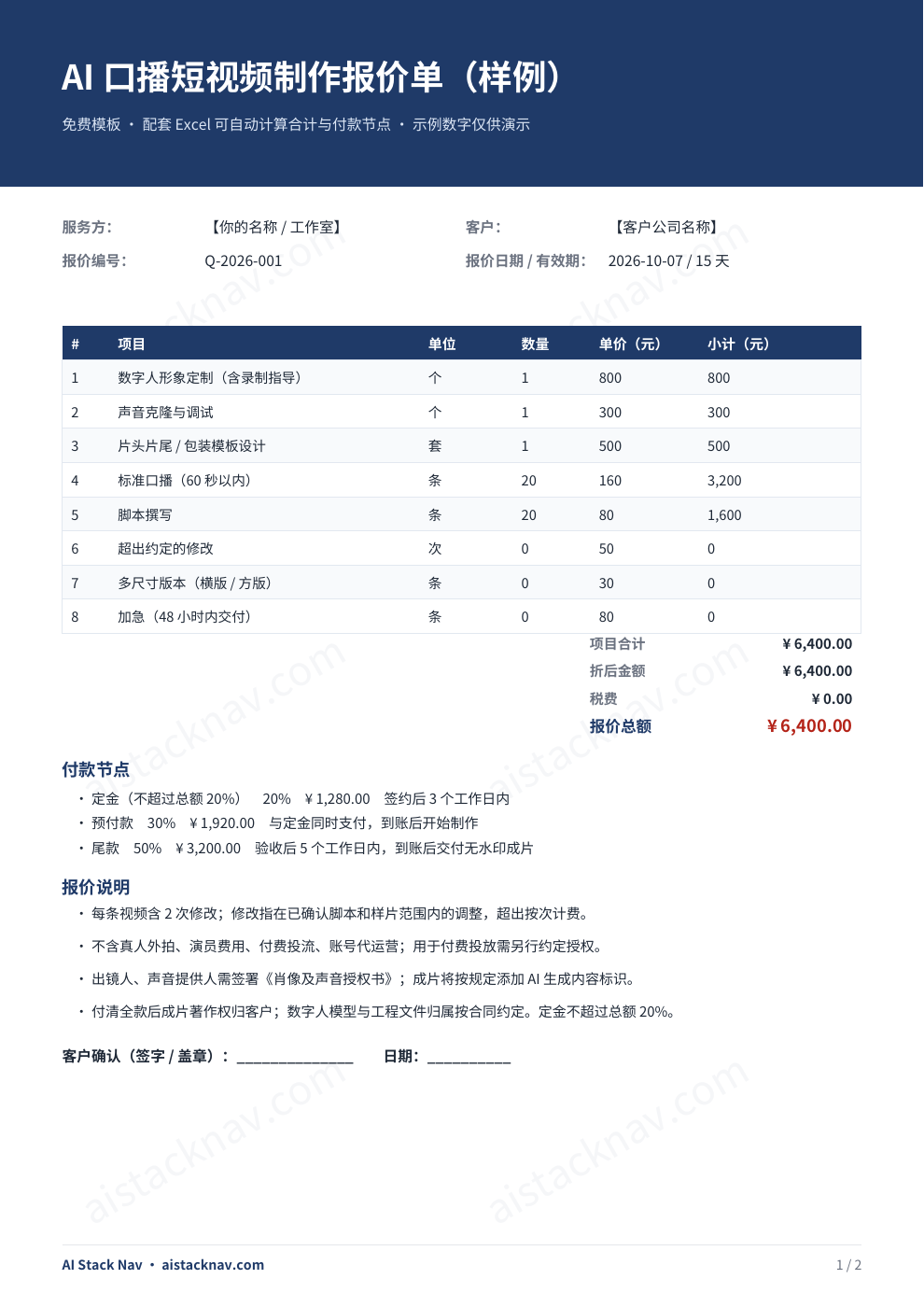
Create a clear, checkable quote

Preview the Free Quote TemplateThe actual inner page of the free verbal price list is shown; the sample amount is for demonstration purposes only.

Practise listing deliverables, fees and payment milestones before deciding whether you need the complete client workflow toolkit.

Get the Free Quote Template →
Automation workflow

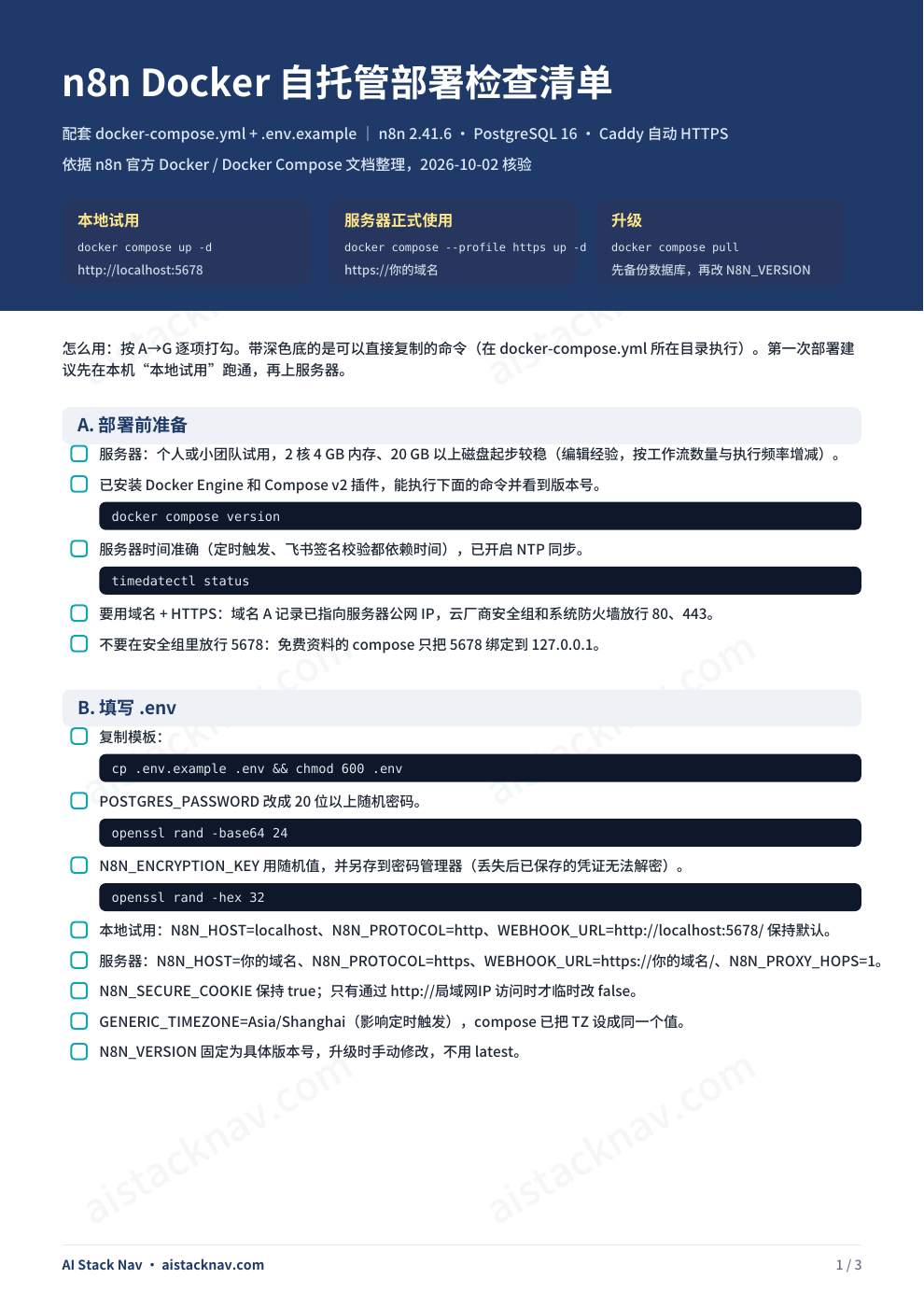
Check your setup before deployment

Preview the Free Deployment Checklistn8n Free Deployment Checklist (Actual First Page)

Check Docker, environment variables and verification commands against the checklist. This is a sample checklist, rather than evidence of a paid workflow running in production.

Get the Free Deployment Checklist →
Go further when you need the complete files

Featured resource packs

Productivity · Document workflows

Long-document Productivity Toolkit

Editable templates for administrators, operations teams and project managers. Create management summaries, extract meeting action items and review proposals with a human review log.

  • A framework for comparing three tools
  • Fictional practice tasks and review templates
  • Software accounts and subscriptions sold separately
Video services · Client delivery

Client Order SOP for AI Video Services

For freelancers who already know how to produce talking-head videos. Manage briefs, quotes, agreements and client sign-off in one workflow, with clear revision limits and delivery requirements.

  • Step-by-step SOP and client brief questionnaire
  • Quote calculator and reference contract template
  • Delivery checklist and client message templates
Automation · Setup experience required

n8n Workflow Toolkit

For users comfortable with Docker and credentials. Browse workflows for data collection, daily and weekly reports, data sync, backups and monitoring, then configure the scenario you need.

  • 20 workflow JSON files
  • Setup notes and checklists
  • Your own n8n instance and credentials required

Explore by topic

Find related tools, tutorials and resource packs in one place, so you can move from learning the basics to trying a project.

Selected practical tools

ChatGPT Tool Introduction

ChatGPT

Office work and content drafting: Organizing ideas, rewriting documents, and generating initial drafts; key facts require manual verification. See the ChatGPT tool introduction →

Claude Special Feature

Claude

Document and code collaboration: Organizing long documents, reviewing drafts, and assisting with programming; output still requires verification and testing. View the Claude feature →

Midjourney Special

midjourney

AI Image Generation: From prompts to iterative visuals, ideal for creative sketches and visual exploration. View the Midjourney feature →

ComfyUI Special Topic

ComfyUI

Node-based image workflow: Suitable for users who need to control the generation process. Before local deployment, verify your graphics card and installation requirements. See the ComfyUI topic →

Introduction and Tutorial

AI Talking-head Video Services: Client Workflow & Pricing

A nine-step workflow for client video projects, from estimating costs and setting a price to managing revisions and final payment. Includes a free quote template and guidance on disclosure, likeness and voice permissions, deposits and copyright.

Developer Project

Suitable for readers with Python, API, or deployment experience. Choose a project to continue practicing, focusing on enterprise governance, knowledge retrieval, and plugin distribution.

Agent Plugin Marketplace

Paid materials · ¥69.00

See product details for delivery contents, file list, and usage conditions.

Learn Skills and MCP plugin signature verification, approval, isolated installation, and rollback. Includes offline tutorial source code and governance templates, suitable for teams with development experience.

Frequently Asked Questions and Customer Service

Once you find the right content, verify the delivery method; you can directly view the download history for materials that have already been received or purchased.

What's the difference between free samples and paid materials?

Use the free sample to try the workflow and check the requirements. See the toolkit page for included files, formats, intended users, and prerequisites.

Where can I download it after claiming or purchasing it?

After order completion, go to "My Downloads " to view the file. If you encounter any issues finding your order or having download problems, please refer to the Purchase and Delivery Instructions and contact support.

What else needs to be confirmed before purchasing?

Please confirm whether the information matches the task, whether you need to provide your own software account or deployment environment, and the refund and after-sales policy . Please also check the testing boundaries and usage conditions indicated on the product page.

About AI Stack Nav

We've compiled AI tools, comprehensive tutorials, resource packages, and practical workflows into a continuously updated navigation site.

About Us

AI Stack Nav is designed for beginners, operators, developers, and content creators who want to truly make good use of AI. It continuously compiles handy AI tools, tutorials, downloadable materials, and project case studies.

Author Background

The content is based on real-world testing tools, actual configuration processes, tutorial reviews, and troubleshooting of common errors, with a focus on whether ordinary users can successfully complete registration, use, deployment, purchase, and delivery.

Why choose us?

Rather than simply collecting links, we place greater emphasis on tool categorization, Chinese tutorials, supporting materials, troubleshooting, and workflow integration to help users move from "knowing the tool" to "completing the task."